
Table of Contents
You have a healthy Bilt balance, and United has a business class seat you want. Should you move your points to United, or book through the Bilt portal at a fixed rate?
The answer depends on award space, your route, and the value each option gives you per point. A wrong move costs you, because a transfer cannot be reversed once it completes.
Moving Bilt points to United looks simple, but the decision behind it is not. How do you know space exists before you transfer? And when does the portal actually make more sense?
In this article, you will learn how a Bilt to MileagePlus transfer works, how to complete one step by step, and how to choose between a transfer and the portal.
TL;DR
- Confirm United award space before you move any points, because every transfer is final.
- Compare your target flight against the portal’s fixed 1.25 cents per point before you decide.
- Check your minimum transfer (2,000 points for Blue, 1,000 for higher tiers) and match your account names.
- Look for transfer value on premium cabins and partner awards, where portal pricing rarely competes.
- Avoid the common errors: transferring early, ignoring taxes and fees, and assuming you can reverse a transfer.
How Bilt Points to United Transfers Work
Most transfer regrets start with a rule the reader learned after clicking confirm. The mechanics of Bilt points to United transfers are simple, but a few details decide how much flexibility you keep. Bilt’s United terms and transfer partner page confirm the details below.
| Detail | What to Know | Why It Matters |
|---|---|---|
| Transfer ratio | 1:1, so 5,000 Bilt points become 5,000 MileagePlus miles | No conversion loss, so value depends on the flight you book |
| Minimum transfer | 2,000 points for Blue status; 1,000 for Silver, Gold, and Platinum | Small top-ups may need a larger transfer or a higher tier |
| Increments | Transfers move in set increments shown in the Bilt app | Round your transfer to what you need and check the leftover balance |
| Timing | Often immediate, but allow up to 48 hours | Avoid transferring at the last minute when space is scarce |
| Reversibility | Final, with no way to move miles back to Bilt | Confirm space first, because a wrong transfer cannot be undone |
| Account link | Link your MileagePlus number in the Bilt app before transferring | Keep names identical on both accounts to avoid delays |
The reversibility row shapes every other decision. Once Bilt points become MileagePlus miles, United’s program rules govern them, and United can change award pricing. Verify space before you transfer, not after.
How to Transfer Bilt to MileagePlus Step by Step
The order of your steps matters more than the clicks themselves. If you transfer first and search second, you risk holding miles with no seat to spend them on. This workflow keeps your options open until the last moment.
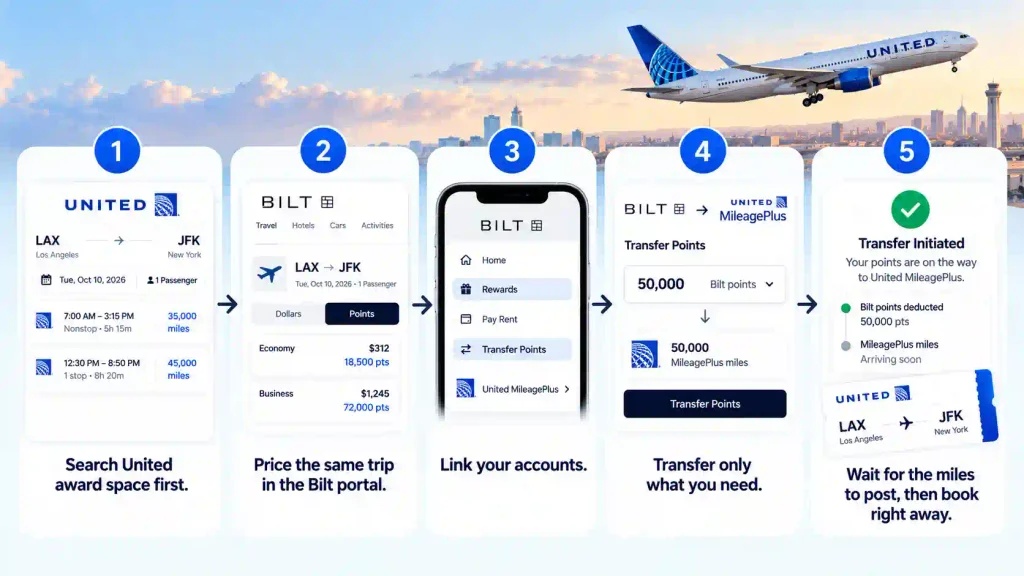
- Search United award space first. Use the United website to price your exact route and dates. United quotes awards one way, and prices depend on the city pair, date, and demand.
- Price the same trip in the Bilt portal. Note the cash fare and the points cost so you can run the comparison in the next section.
- Link your accounts. In the Bilt app or on the website, open the Rewards tab, choose Transfer, and select United MileagePlus. Follow the prompts to link your MileagePlus number.
- Transfer only what you need. Move enough miles to cover the award plus a small buffer, and leave the rest in Bilt where it stays flexible.
- Wait for the miles to post, then book right away. Most transfers arrive quickly, but award space can disappear while you wait.
If the seat you want has not appeared yet, repeated manual searching wastes time. Flightpoints Alerts monitors award availability, so you can time your Bilt United transfer around real space instead of guessing.
When Auto-Transfer Makes Sense
Auto-transfer suits a narrow group of readers, and it removes flexibility that many points users value. Bilt’s United page explains how the feature works.
- Who it fits: Readers who pay rent with a qualifying United MileagePlus card and want steady mileage growth.
- How it works: According to Bilt’s terms, eligible points convert to MileagePlus miles on or about the 15th of each month.
- The tradeoff: Points leave Bilt automatically, so you lose the option to use the portal or another transfer partner.
- A requirement: The name on your MileagePlus account must match your Bilt account for auto-transfer to complete.
Bilt United Transfer vs Bilt Travel Portal
Every award booking raises the same question: does the transfer beat the portal for this trip? The portal gives you a fixed floor, while a Bilt United transfer can land well above or below it. Compare both before you commit.
| Factor | Bilt United Transfer | Bilt Travel Portal |
|---|---|---|
| Value per point | Varies by flight and can exceed the portal on strong awards | Fixed at 1.25 cents, so 10,000 points equals $125 |
| Flexibility | Final once transferred | Points stay in Bilt until you book |
| Depends on | Award space being available | A cash fare being available |
| Best for | Premium cabins, partner awards, and high cash fares | Low fares, no award space, and simple bookings |
The Cents-Per-Point Test
A transfer only wins when it beats the portal’s 1.25 cents on your specific flight. The test takes a minute and removes most of the guesswork.
- Step 1: Subtract the award’s taxes and fees from the cash fare.
- Step 2: Divide the result by the miles required.
- Step 3: Compare the answer to 1.25 cents, and transfer only if it is clearly higher.
To skip the manual math, you can run your numbers through the Flightpoints CPP Calculator.
The examples below use illustrative numbers, not quoted prices.
| Scenario | Cash Fare | Portal Cost | Award Cost | Value per Mile | Better Choice |
|---|---|---|---|---|---|
| Long-haul business class | $2,000 | 160,000 points | 80,000 miles + $150 | About 2.3 cents | Transfer |
| Short domestic flight | $180 | 14,400 points | 25,000 miles + $6 | About 0.7 cents | Portal |
| Use Case | Why It Can Work | Watch Out For |
|---|---|---|
| Star Alliance partner business class | Commonly cited at about 75,000 to 88,000 miles one way to Europe, Japan, and Australia, often well below cash fares | Space is limited, and pricing varies by partner and route |
| United Polaris business class | Can price near 60,000 miles to Europe when saver space appears | This is not an everyday price and depends on availability |
| Short-haul U.S. economy | Roughly 5,000 to 12,500 miles when cash fares run high | Low cash fares often make the portal the better choice |
Treat these figures as observed benchmarks, not guaranteed prices. The only reliable method is to search your exact itinerary before you transfer.
Two shifts in thinking help here:
| Before | After |
|---|---|
| "I have 100,000 points, so I will book the cheapest portal fare." | "I will price both options, calculate cents per point, and transfer only if space exists and value beats 1.25." |
| "United miles are always worth more." | "Value depends on the cabin, the route, and the cash fare I would otherwise pay." |
Comparing routes by hand takes time. Flightpoints Routes helps you compare redemption paths across programs, and Explore helps you narrow destinations when your dates are flexible.
Bilt vs Chase Points for United: Which to Spend First
Bilt and Chase are the two major issuers that transfer to United at 1:1, so cardholders with both face a real choice. Both balances can reach MileagePlus, but they do not reach the same set of other programs. That difference should guide which balance you spend.
- Protect the balance with fewer alternatives: Spend the currency whose other partners you are less likely to use.
- Keep Bilt for its unique partners: Bilt reaches programs such as Atmos Rewards (Alaska and Hawaiian) and Japan Airlines, which Chase does not offer.
- Keep Chase for its own strengths: If your planned trips run through Chase's partners, hold that balance instead.
Common Mistakes When Transferring Bilt Points to United
Most costly errors in a Bilt to MileagePlus transfer come from moving too early or measuring value the wrong way. Each mistake below is avoidable with a quick check.
| Mistake | Why It Costs You | Better Move |
|---|---|---|
| Transferring before confirming space | Miles sit idle, and you cannot send them back | Search the exact itinerary first |
| Ignoring taxes and fees | Cents-per-point looks better than it really is | Subtract cash fees before you calculate |
| Comparing against an inflated fare | The transfer appears to win when it does not | Use the fare you would actually pay |
| Mismatched account names | Auto-transfer can fail or delay | Match names on both accounts |
| Transferring extra "just in case" | You lock points into one program | Move only what the booking needs |
| Treating benchmarks as fixed prices | United prices awards dynamically | Recheck the price at booking |
How Flightpoints Helps You Decide Before You Transfer
The hardest part of a Bilt United transfer is not the transfer itself. It is the manual work before it: checking several programs, watching for seats that vanish, and worrying about wasted points. Every extra search adds time and raises the odds of a costly guess.
Flightpoints is a decision-clarity tool that sits between your credit card points and airline programs. It helps you compare options before you commit, using the features that matter most here:
- Alerts: Monitors award availability, so you can time a transfer around real space.
- Routes: Compares redemption paths, so you see which option needs fewer points.
- Explore: Narrows destinations and dates when your plans are flexible.
Conclusion
Moving Bilt points to United works best when you treat the transfer as the last step, not the first. Confirm space, run the cents-per-point test against the portal's 1.25 cents, and transfer only what you need. The mistake to avoid is committing points to a seat you have not verified.
The real challenge is the effort of comparing programs and tracking availability by hand. Flightpoints reduces that workload by putting redemption options side by side, so you can choose with more confidence.
Explore how Flightpoints can narrow your options before your next transfer.
Discover the True Value of Your Points
Ready to see what your points are really worth? Get Flightpoints Pro and find the cheapest award seat across every program in seconds.
Get Flightpoints ProFAQs
Q: Can You Combine Bilt and Chase Points for One United Award?
A: Yes, if both currencies transfer into the same MileagePlus account. Move each balance separately, wait for both to post, and then book the award with the combined miles. Confirm the total miles and award space first, because neither transfer can be reversed.
Q: What Happens If Award Space Disappears After You Transfer Bilt Points to United?
A: Your miles stay in your MileagePlus account, but you cannot send them back to Bilt. You can search nearby dates, alternate airports, or a different cabin, and you can keep watching in case space reopens. This risk is why checking availability before you transfer matters so much.
Q: Are Taxes and Fees Extra on United Awards Booked With Bilt Points?
A: Most award tickets still require a cash payment for taxes and fees, and the amount varies by route and airline. Check the total cash due before you calculate your cents per point. High surcharges can shrink the value of an otherwise strong award.
Q: Is It Worth Transferring Bilt Points to United for Economy Flights?
A: Usually only when cash fares run high, such as last-minute trips or peak dates. On cheap fares, the portal's fixed 1.25 cents per point often wins, as the short domestic example in this article shows. Run the cents-per-point test on your exact flight before you decide.
Q: Can You Book a United Award for Someone Else With Transferred Miles?
A: MileagePlus generally lets you book award tickets for other travelers, so family and friends can use your transferred miles. Rules on passenger names and changes can vary, so confirm the details on united.com before you book. Make sure every traveler's name matches their passport or ID exactly.